Real Estate Automation

Real Estate Automation System: Voice Calls, Listing Matching, Appointment Follow-Up

AI-powered automation for the real estate sector. Recognizes incoming leads, recommends listings, creates appointments, follows up. Works via WhatsApp and Telegram; the voice-call setup is built per project.

Get a Quote via WhatsApp

I can't keep up with incoming messages and leads are slipping away. What should I do?

Real estate agents receive dozens of messages daily. Most replies are late or never sent, and the client moves on to another agent.

KILMAN Real Estate Automation System activates the moment a message arrives: it recognizes the client, understands their needs, finds a suitable property from your listings, and creates an appointment. Your clients get answered even while you are in a meeting.

How does the chat flow work?

When a message arrives, the system first works out who is writing and what they are looking for. Number of rooms, area, budget. Instead of asking these one by one, it takes what it can from the wording the client used and asks only for what is missing.

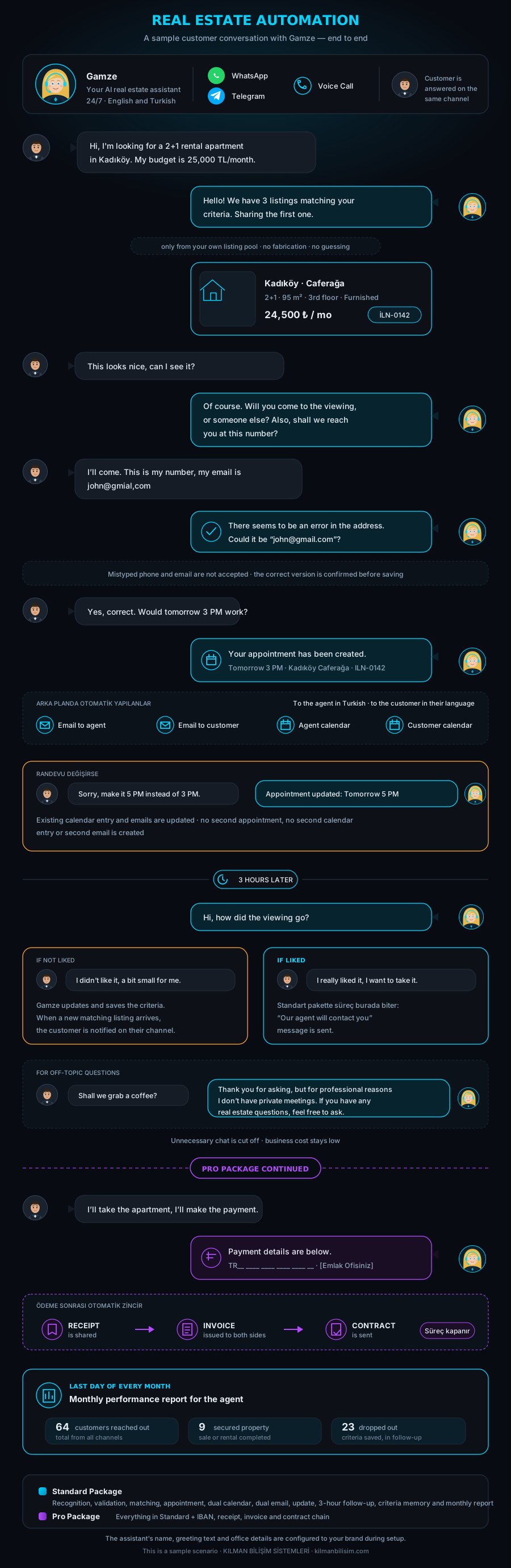
It then looks at your listing pool and shows the properties that match. If the client is interested, it creates an appointment. If not, it records what they were looking for. The flow chart below shows each step of this process.

KILMAN Real Estate Automation System: Chat flow infographic

What does the system consist of?

Message handling

It answers messages arriving over WhatsApp and Telegram; the voice-call channel is set up per project. The same system runs on every channel that is set up, so a client gets the same answer whichever one they write from. Messages do not sit unanswered while you are in a meeting or outside working hours.

Listing pool

The properties you handle are held in the system: location, number of rooms, price, floor area and the features worth mentioning. The system looks only at this pool. A property that is not in the pool does not get shown to a client.

Matching

It compares what the client described against the listings in the pool and shows the ones that fit. Where nothing fits exactly, it offers the closest ones and says what the difference is. It does not guess about price or location, it passes on the recorded information.

Appointments and calendar

If a client wants to see a property, the system creates an appointment. You and the client each receive an email, and a Google Calendar entry opens for both sides. The time and the address sit in the same place for everyone involved.

Follow-up after the viewing

A few hours after the appointment it asks the client how it went. If the answer is positive it moves to the next step. If not, it finds out why and suggests a way forward. Without this follow-up, what the client thought usually stays unknown.

Open requests

If a client likes none of the properties shown, what they were looking for goes on record. When a new listing that fits enters the pool, the system tells that client about it. A person who is not a buyer today stays on the list as an open request.

Which package should I choose?

Standard Package

Real Estate Standard

  • ✅ Only shows your listings, never shows another agent's listings; the system is connected only to your own listing pool
  • ✅ Never fabricates a listing that doesn't exist
  • ✅ Never guesses about price, location or features, only provides registered data
  • ✅ Recognizes the client and understands their request
  • ✅ Finds and presents suitable properties from your listing pool
  • ✅ Creates appointments for liked properties
  • ✅ Sends separate emails to the agent and client
  • ✅ Creates Google Calendar events for both parties
  • ✅ Asks for the meeting result 3 hours later
  • ✅ Offers solutions for negative feedback, continues until satisfied
  • ✅ If not liked, saves criteria and notifies when a matching listing arrives
  • ✅ Politely but firmly redirects off-topic questions back to real estate
  • ✅ Aims to keep unnecessary chat short, which can contribute to operating costs
  • ✅ Turkish and English
Get a Quote
Recommended
Pro Package

Real Estate Pro

Everything in Standard, plus:

  • ✅ Sends the agent's IBAN when a property is reserved
  • ✅ Shares the payment receipt
  • ✅ Issues automatic invoices to agent and client
  • ✅ Sends the contract
  • ✅ Runs the entire sales chain in a single flow
Get a Quote

Does the system give wrong information?

No. The system only uses data from your own listing pool. It never shows another agent's listings, never fabricates a listing that doesn't exist, and never guesses about price or location.

Only verified data is presented to the client. Off-topic questions are politely but firmly redirected back to real estate, cutting unnecessary chat and keeping your operating costs low.

How does the setup process work?

1 Discovery

We learn your workflow and listing portfolio. We go through which channels your messages arrive on, where your listings are kept, and how a normal day runs.

2 Configuration

We set up your listings, working hours, and communication channels in the system.

3 Testing

You test the system as if you were a client. You tell us what looks missing or wrong, and we correct it.

4 Go Live

The system starts working with real clients.

5 Support

The system is monitored; we intervene if issues arise.

Frequently Asked Questions

How do my listings get into the system?

We transfer them together during the configuration step. We take them from wherever they are held now: your portal account, a spreadsheet, or your own list. New listings are updated from the same place.

What happens if a client calls instead of writing?

The voice-call channel is set up per project. Once it is in place the client speaks, the system understands and answers. A request that arrives by message and one that arrives by phone land in the same place, so you do not keep two separate lists.

Does it work outside working hours?

Yes. Messages arriving in the evening or at the weekend are answered, listings are shown, and appointments are created. Appointment times are defined according to your own hours, and the system does not book outside that window.

There are several of us in the office. How is the work divided?

We decide that together during setup. Incoming requests can sit in one shared pool, or they can be distributed by area, listing type, or in turn. The appointment notice then goes to whoever took that request.

Can I use my existing WhatsApp number?

We go through this in the conversation before setup. The route depends on the type of account the number is registered to, and both are possible: either the existing number is connected to the system, or a separate business number is defined.

Where is client data stored?

The data belongs to you and is held in your own account. A confidentiality agreement is signed before setup, and it states in writing which data is processed where. If you decide to leave the system, your records are handed over to you.

Contact us for information about the real estate automation system.

Get a Free Quote via WhatsApp